To log in to your E-ZPass PA account, go to the PA Turnpike E-ZPass portal, then enter your username and password.
Log in to your E-ZPass PA account through the PA Turnpike website at paturnpike.com/e-zpass. Click Login, enter your username and password, and select Sign In. Your dashboard shows your balance, toll history, and payment settings. You can also sign in through the PA Toll Pay mobile app with the same credentials.
The Pennsylvania Turnpike Commission runs E-ZPass PA. Your transponder uses RFID to pay tolls as you drive, with no stopping. E-ZPass rates run about 50% lower than Toll By Plate, so you save on every trip.
As of the January 2026 rate change, a common passenger-car toll costs $1.94 with E-ZPass and $3.88 with Toll By Plate. Set auto-replenishment and the system adds $35 per transponder once your balance drops to $10. For help, call PA Turnpike E-ZPass Customer Service at 1-877-736-6727, open 8 a.m. to 6 p.m., Monday through Friday.
Below, you get step-by-step login help, sign-up steps, current fees, transponder tips, and fixes for locked accounts and reset passwords.
What Is E-ZPass PA?
E-ZPass PA is Pennsylvania’s electronic toll collection system. It lets you pay tolls without cash and without stopping at a booth. The Pennsylvania Turnpike Commission manages the program.
Your account links to a small RFID transponder mounted on your windshield. When you drive under an overhead gantry, the reader charges the correct toll to your prepaid balance. More than 85% of Turnpike transactions run through E-ZPass.
E-ZPass PA covers every PA toll road. That list includes the Mainline (I-76 and I-276), the Northeast Extension (I-476), and the tolled I-95 section near Philadelphia. Landmarks along the way, like the Lehigh Tunnel and the Delaware Water Gap, sit on covered routes.
Your PA transponder also works across the wider E-ZPass network. That network spans about 19 states, from Maine to Illinois and south to Florida. One tag and one account cover the Ohio Turnpike, the New Jersey Turnpike, and dozens of other roads.
Why Drivers Choose E-ZPass PA?
E-ZPass saves you money on every trip. You pay about half the Toll By Plate rate on the same road. Frequent drivers and commuters save the most.
The tag also saves time. You pass through E-ZPass lanes and highway-speed gantries without slowing for a booth. Fewer stops mean less merging and safer roads.
Your account reaches beyond tolls too. E-ZPass Plus lets you pay for parking at select airports and lots with the same tag. The 511PA service adds free traffic alerts and route planning for your drive.
How to Log In to E-ZPass PA? (Step by Step)
Signing in takes under two minutes. Follow these four steps.
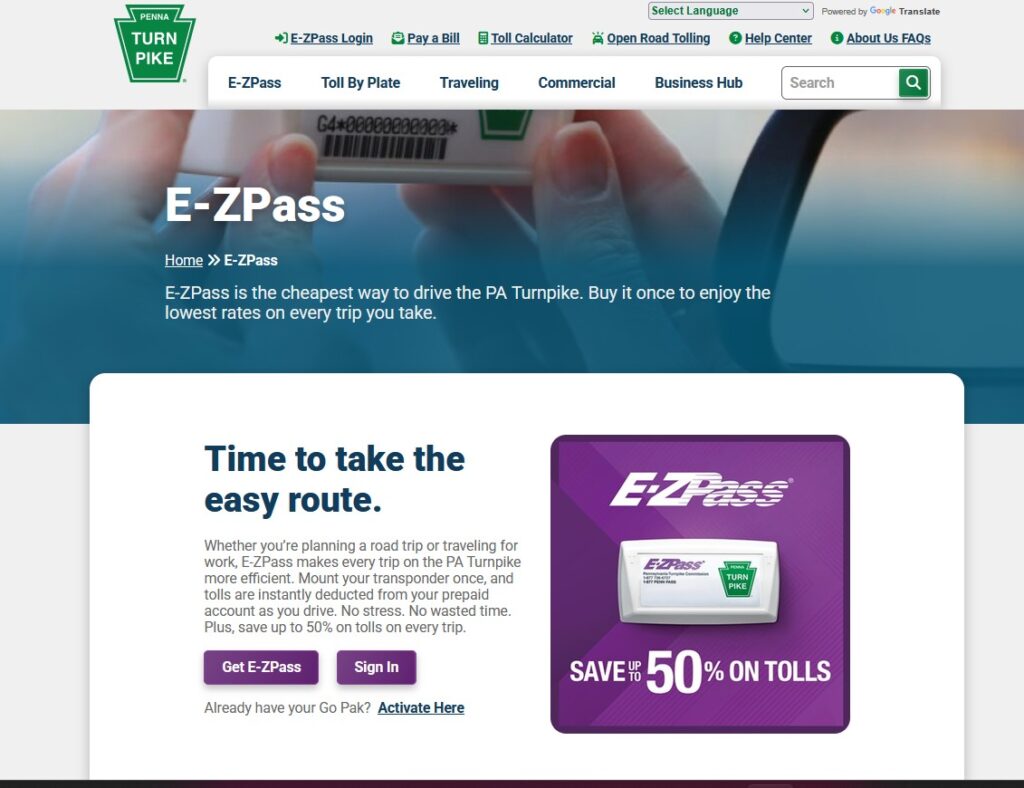
Step 1: Open the login page
Go to paturnpike.com/e-zpass on any browser. Click Login in the top-right corner. Confirm the web address before you type anything, since lookalike sites copy the login screen.
Step 2: Enter your credentials
Type your username or Customer ID and your password. Select Sign In. If you forget your username, click “Forgot Username” and enter your registered email.
Step 3: Use the PA Toll Pay app (optional)
Download PA Toll Pay from the App Store or Google Play. Sign in with the same username and password. The app works well for quick balance checks on the road.
Step 4: Check your account
Your dashboard shows your balance, recent tolls, and vehicles. From here you add money, update your card, or view your statement. You can also add or remove a vehicle in seconds.
Login Requirements and Troubleshooting
You need three things to sign in: a username, a password, and a supported browser. A stable internet connection matters too. Most login errors trace back to one of these.
Use a current version of Chrome, Firefox, Safari, or Edge. Old browsers often fail to load the login box. Run a recent operating system too, such as Windows 10 or later, macOS 11 or later, or an up-to-date phone.
Here are the most common problems and fixes.
- Forgot password: Click “Forgot Password,” then follow the reset link sent to your email. Set a new password with at least 8 characters, mixing letters and numbers.
- Forgot username: Click “Forgot Username” and confirm your registered email or account number.
- Account locked: Too many wrong tries can lock your account. Reset your password or call 1-877-736-6727 to verify your identity.
- Session expired: The portal signs you out after inactivity for security. Re-enter your credentials to continue.
- Page won’t load: Clear your browser cache, then reload. A stale cache blocks the login box.
- Site down: Scheduled maintenance can take the portal offline. Try the PA Toll Pay app or wait and retry.
Save your username in a password manager. That one habit prevents most repeat lockouts.
How to Sign Up for E-ZPass PA?
You have three ways to get an E-ZPass in Pennsylvania. Pick the one that fits your timeline.
- Order online. Sign up at the official PA Turnpike site. Your transponder arrives by mail in about 7 to 10 business days.
- Buy a Go Pak in person. Grab one at a grocery store or pharmacy the same day. Register it before you drive.
- Apply by phone or mail. Call 1-877-736-6727 or mail the paper application to the Harrisburg service center.
Have your details ready before you start. You need your driver’s license, license plate number, vehicle make and model, and a payment card. Registration takes under 15 minutes.
A Go Pak includes the transponder and a setup insert. Find the 11-digit transponder number and the 4-digit security code inside the packet. Enter both online or in the PA Toll Pay app to activate.
One rule saves you money here. Register the Go Pak a full day before you drive. Use it too early and you get a Toll By Plate bill at the full, non-discounted rate.
Account Types: Personal vs Commercial
E-ZPass PA offers two main account types. Your vehicle and your use decide which one fits.
Personal account
A personal account suits drivers using their own car or truck. You register your vehicle, mount the transponder, and link a card. You save about 50% versus Toll By Plate on every trip.
Add multiple vehicles to one personal account. Each vehicle needs its own transponder for accurate reads.
Commercial account
A commercial account fits businesses running several vehicles. It offers fleet management and volume discounts for frequent trips. Some high-volume accounts require a surety bond.
Choose prepaid or postpaid billing based on your cash flow. Contact the PA Turnpike commercial team to pick the account class that matches your fleet.
How To Manage Your E-ZPass PA Account?
Your online account handles almost everything. Sign in to check your balance, update payments, or fix an issue. Spend a few minutes a week and you avoid surprise bills.
Check your balance
Open your dashboard and look at the top of the page. It shows your current balance, recent tolls, and charges. The PA Toll Pay app shows the same numbers on your phone.
Auto-replenish and payment methods
Turn on auto-replenishment to stay funded. The system adds $35 per transponder each time your balance drops to $10 or less. Drivers who reload more than three times a month get a higher top-up.
Pay by credit card, debit card, or bank transfer. Update an expired card under Payment Options before your next trip. Manual payers should watch the balance closely to avoid a violation.
Settings, alerts, statements, and vehicles
Turn on email or text alerts for low balances and tolls. Add or remove a vehicle under the Vehicles tab. You can also add a rental car and mark it with start and end dates.
Download your statement for taxes or expense records. Keep your profile and plate current so refunds and notices reach you.
Your Transponder: Mount, Activate, Replace, Return
Correct mounting keeps your tolls accurate. A tag in the wrong spot may fail to read, and you get billed at the higher Toll By Plate rate.
Follow these steps to mount and activate.
- Clean the glass. Wipe the inside windshield with an alcohol pad.
- Position it right. Place the tag behind the rearview mirror, near the top center.
- Press firmly. Hold it down so the adhesive sticks.
- Register first. Enter your transponder number online or in the app before you drive.
- Wait for activation. Your tag works within 24 hours on the PA Turnpike and 48 hours on out-of-state roads.
If your tag is lost or broken, sign in and report it, then order a replacement. To close an account, deactivate the tag and follow the return steps in your portal or call customer service. The official site lists current replacement and return fees.
E-ZPass PA vs Toll By Plate: How Much You Save?
E-ZPass and Toll By Plate charge very different rates. Toll By Plate uses cameras to photograph your plate, then mails a bill. That extra handling costs you more.
As of January 2026, a common passenger-car trip costs $1.94 with E-ZPass. The same trip costs $3.88 with Toll By Plate. That gap is exactly double, and it repeats at every toll point.
Commercial rates show the same split. A Class-5 tractor-trailer segment runs about $24 with E-ZPass versus about $48 without. The transponder pays for itself in one or two trips.
Use the toll calculator on the PA Turnpike site to price your route first. Enter your start, end, and vehicle type to see the E-ZPass rate before you drive.
Open Road Tolling and Cashless Tolls
The PA Turnpike removed cash toll booths in 2020. Every toll now runs through E-ZPass or Toll By Plate. No booth, no cash, no stopping.
The Commission is converting the road to Open Road Tolling in phases. Overhead gantries charge your tag at highway speed. Fewer slowdowns mean less merging and fewer rear-end crashes.
You need an active E-ZPass tag or a Toll By Plate account to use the road. Check the official site for current gantry locations and the rollout schedule.
Where to Buy? Retailers and Service Centers
You can buy an E-ZPass in Pennsylvania online, at a store, or in person. Retail Go Paks sell at thousands of grocery and pharmacy locations statewide.
Chains like Giant, Giant Eagle, Acme, Weis, and Wegmans carry the Go Pak. AAA Central Penn and authorized auto-tag shops sell and register tags on the spot. Use the zip-code locator on the PA Turnpike site to find the nearest one.
For in-person help, visit a PA Turnpike Customer Service Center.
| Service point | Location | Contact | Hours |
|---|---|---|---|
| PA Turnpike Customer Service Center | 300 East Park Drive, Harrisburg | 1-877-736-6727 | Mon–Fri, 8 a.m.–6 p.m. |
| Go Pak retailers | Statewide (Giant, Acme, Weis, Wegmans) | Varies by store | Store hours |
| AAA / auto-tag agents | Statewide | Varies by location | Varies |
Call ahead to confirm stock before you drive to a store. Some shelves run out during busy travel weeks.
E-ZPass PA Violations and How to Resolve Them?
A violation notice means a toll went unpaid. Common causes include a low balance, an unregistered Go Pak, or a tag that failed to read. Ignore it and the fees pile up.
Fix a violation in three steps.
- Sign in and open your toll history to view the notice.
- Pay or dispute the toll online, with proof if the charge looks wrong.
- Call support at 1-877-736-6727 if you need help or want to appeal.
Unpaid tolls can lead to added fees and, over time, a suspended vehicle registration. Keep your balance funded and your plate current to avoid both. Set alerts so you catch a low balance early.
E-ZPass PA Costs and Fees at a Glance
Here are the current, verifiable numbers. Fees change, so confirm the latest on paturnpike.com before you buy.
| Item | Cost (2026) |
|---|---|
| Go Pak (online / standard) | $38 total ($35 toll credit + $3 annual fee) |
| Go Pak (retail pickup) | About $45 (adds a service fee) |
| Annual account fee | $3 |
| Auto-replenish top-up | $35 per transponder when balance hits $10 |
| Common passenger toll (E-ZPass) | $1.94 |
| Common passenger toll (Toll By Plate) | $3.88 |
| E-ZPass savings vs Toll By Plate | About 50% |
| Go Pak activation | 24 hours (PA) / 48 hours (other states) |
Your real out-of-pocket cost to start is about $3. The $35 is toll money you would spend anyway.
Frequently Asked Questions
Is the E-ZPass PA login the same as the PA Toll Pay app login?
Yes. Use the same username and password for the website and the PA Toll Pay app. Both open the same account.
How do I reset my E-ZPass PA password?
Click “Forgot Password” on the login page. Follow the reset link sent to your email. Set a new password with at least 8 characters.
How much does an E-ZPass transponder cost in PA?
A Go Pak costs $38 online, which includes $35 in toll credit and a $3 annual fee. Retail pickup often runs about $45.
Does E-ZPass PA work in other states?
Yes. Your PA tag works across the E-ZPass network, about 19 states from Maine to Florida and west to Illinois. You pay each state’s local rate.
What happens if I ignore a toll violation?
The fees grow, and the toll goes to collections. Repeated unpaid tolls can suspend your vehicle registration. Pay or dispute the notice quickly.
Can I add a rental car to my E-ZPass PA account?
Yes. Sign in or use the PA Toll Pay app, add the vehicle, and mark it as a rental with start and end dates. Check the rental company’s toll policy too.
Can I buy an E-ZPass PA gift certificate?
Yes. You can gift a Go Pak or prepaid balance through retailers and the official site. The recipient registers it to a new or existing account.
How long does a login session last?
The portal signs you out after a period of inactivity for security. Re-enter your username and password to return to your account.
The Bottom Line
E-ZPass PA cuts your PA Turnpike tolls by about half and skips every booth. Sign in at paturnpike.com/e-zpass to check your balance, update payments, and manage vehicles. Turn on auto-replenishment so you never hit a violation.
Bookmark the official login and keep the PA Toll Pay app on your phone. Confirm current fees and rates on paturnpike.com, since the Commission updates them each year. Set a low-balance alert today and travel Pennsylvania’s toll roads without surprises.
Sources: Pennsylvania Turnpike Commission (paturnpike.com); January 2026 toll rates reported by CBS News Philadelphia. Rates and fees are current as of July 2026 and subject to change. Confirm all figures against the official PA Turnpike site and your own account terms.